


Running a business on disconnected tools is not a technology problem. It is a growth problem wearing a technology mask.
Finance closes the books one way. The warehouse tracks inventory another way. Sales updates a CRM that no one else looks at. And when leadership asks for a consolidated picture of where the business stands, someone spends two days pulling it together manually.
This is the operational reality for most small and mid-sized businesses before they move to a proper ERP. And Microsoft Dynamics 365 Business Central implementation is, for many of them, the decision that changes it.
Most businesses do not fail at implementation because they chose the wrong software. They fail because nobody told them what the process actually looks like before they signed the contract. By the time the surprises show up, budgets are committed, timelines are locked, and the room for course correction is very small.
Your Business Central Implementation Deserves More Than a Generic Rollout
Let CaliberFocus map the process around how your business actually operates.
What Is Microsoft Dynamics 365 Business Central ?
Business Central is Microsoft’s cloud ERP for small and mid-sized businesses. It connects financial management, sales, supply chain, inventory, warehouse operations, manufacturing, and project management in one system, and it is built to work natively with Microsoft 365, Power BI, and the Power Platform.
What makes it different from older ERP systems is not the feature list. It is the architecture. Because it lives in the cloud, updates roll out automatically, access is not tied to a physical location, and it scales without requiring new infrastructure every time the business grows.
For a detailed look at how Business Central is structured and what it covers across each functional area, the Microsoft Dynamics 365 Business Central ERP overview is a good place to start before you move into implementation planning.
Is Business Central the Right Fit for Your Business?
Not every business is at the right stage for a full ERP implementation, and Business Central is not designed for everyone.
It is built for businesses that have outgrown accounting-only tools like QuickBooks or Tally, or those running on a legacy ERP that cannot keep up with current operational complexity. The industries where it consistently delivers strong outcomes include manufacturing, distribution, professional services, retail and wholesale, and healthcare.
The common thread is not industry. It is complexity. When a single system can no longer give you an accurate picture of inventory levels, financial position, outstanding orders, and project profitability at the same time, that is the sign that you have grown past what your current tools were built for.
Two Decisions to Make Before the Project Starts
Partner-led or Self-Implementation?
Self-implementation sounds appealing from a cost perspective. In practice, it works only in a narrow set of circumstances: your team has dedicated Dynamics expertise internally, the scope is limited, and customization needs are minimal.
Outside of that, the risk is real. A misconfigured system does not announce itself loudly. It shows up quietly in wrong reports, broken approval workflows, and inventory numbers that do not add up. By the time you catch it, you are looking at remediation costs that often exceed what a partner-led project would have cost from the start.
Working with a certified Microsoft Business Central partner is not just about having someone to do the technical work. It is about having a team that has done this enough times, across enough industries, to know what your business actually needs versus what you think you need at the start of the project.
Cloud or On-Premises?
For most businesses today, cloud is the straightforward choice. No upfront server investment, no internal IT team managing updates and backups, access from any browser or device, and Microsoft handling uptime and security at the infrastructure level.
On-premises deployment is still available for organizations with specific data residency or regulatory requirements. But the operational overhead is significant, and the advantage of automatic updates disappears entirely. If you do not have a specific reason to stay on-premises, cloud is the more practical path.
The Business Central Implementation Process, Phase by Phase
This is the section most guides gloss over with a generic five-step diagram. What follows is what each phase actually involves and why each one matters.
Phase 1: Discovery and Planning
Everything downstream depends on how well this phase is done.
Your implementation partner runs structured discovery workshops with stakeholders across finance, operations, sales, and IT. The goal is to map your current processes, surface the gaps between how you work today and how Business Central will need to be configured, and define the scope of the project clearly before any build work begins.
The output is a solution blueprint. It documents what modules are being implemented, what integrations are required, what data needs to be migrated, who owns which decisions, and what the timeline and milestones look like. Executive alignment happens here too. If the person sponsoring the project at the leadership level is not actively engaged in this phase, decisions stall and timelines slip.
Phase 2: Design and Configuration
With the blueprint signed off, the configuration work begins. This covers the chart of accounts, module setup, user roles and permissions, workflow automation, and the design of any integrations with systems already in use, whether that is Microsoft 365, Power BI, a CRM, or a third-party logistics platform.
One thing worth flagging here: Business Central handles a wide range of business scenarios without customization. Partners who have implemented it across multiple industries know how to configure the system to fit your workflows rather than building custom code that solves a short-term problem and creates a long-term maintenance burden. That judgment call, between configuration and customization, is one of the most consequential decisions in the whole project.
Phase 3: Data Migration
Data migration is where the phrase “garbage in, garbage out” becomes very expensive to ignore.
This phase involves extracting your existing records (customers, vendors, historical financials, open transactions, inventory data), cleaning and standardizing them, and importing them into Business Central using migration templates. The condition of your data going in directly affects how confident the go-live will be.
Teams that audit their data before migration, not during it, tend to have significantly smoother go-lives. Those that defer data cleanup to the migration phase discover problems at the worst possible moment.
Phase 4: Testing and User Acceptance Testing
Testing is not a checkpoint. It is a safeguard.
Functional testing covers individual processes in isolation. Integration testing checks that data is flowing correctly between Business Central and connected systems. Performance testing validates behaviour under realistic load. All of this happens before any real users touch the system.
User Acceptance Testing (UAT) is where your actual team steps in. They test the specific workflows they will use every day, flag anything that does not match the agreed design, and formally sign off before go-live. Getting end users involved at this stage, rather than presenting them with a finished system on launch day, is one of the most reliable predictors of strong post-go-live adoption.
Phase 5: Go-Live and Post-Implementation Support
Go-live is a managed cutover. Your partner coordinates the production switch, provides hands-on support during the hypercare period immediately after launch, and monitors closely as real transactions begin moving through the system.
Training runs in parallel through phases three to five, delivered in role-based sessions. Each team learns what they need to do their job well, not a six-hour walkthrough of every module. Post-implementation work continues after launch: reporting is refined, additional modules are rolled out as the business is ready for them, and the system is optimized as usage patterns become clear.
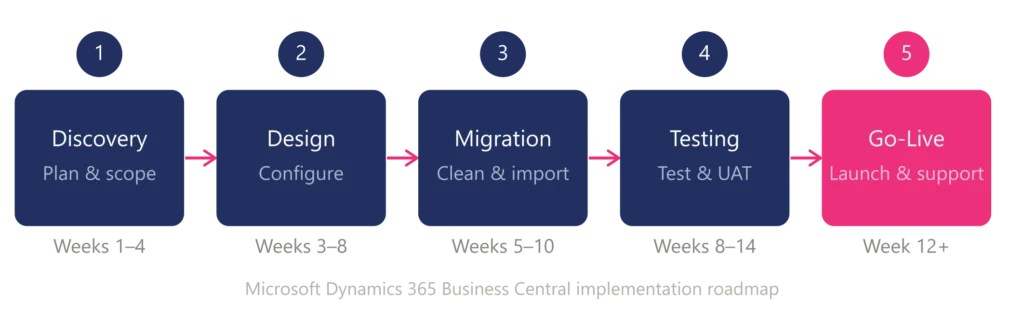
How Long Does a Business Central Implementation Take?
Two broad scenarios:
Standard implementation (3 to 6 months): Multi-module configuration, data migration, integrations with third-party systems, and full training across departments. Businesses with more complex structures or multiple entities typically sit toward the longer end of this range.
Accelerated implementation (6 to 12 weeks): Focused scope, minimal customization, cloud deployment, and a team that can mobilize quickly. This path gets the business live on core functionality faster and phases additional capability in afterward.
The factors that most often stretch timelines are the number and complexity of integrations, the state of existing data, how quickly internal stakeholders can make configuration decisions, and whether the project team has dedicated bandwidth or is managing the implementation alongside their regular responsibilities.
Not sure which implementation timeline fits your business?
Common Implementation Challenges Worth Knowing Before You Start
These are not hypothetical risks. They appear regularly across implementations and are entirely avoidable with the right preparation.
Scope that drifts without being caught: Starting an implementation without a clearly locked scope invites continuous additions that push out the timeline and inflate the budget. The right approach is to define the minimum viable implementation first and build a roadmap for what follows in subsequent phases.
Data that is cleaned too late: Many teams assume data migration is a technical task the partner handles. It is partly that, but the business owns the quality of the data going in. Duplicates, inconsistent naming conventions, and incomplete records that are left unaddressed until the migration phase create problems that surface after go-live when they are far more disruptive to fix.
End users who first see the system on launch day: Adoption is not a training problem. It is a change management problem. Users who are involved in UAT, who have had hands-on time with the system before it goes live, adapt significantly faster than those who encounter it for the first time in a live production environment.
No clear decision-maker on the business side: Implementation projects need someone with authority to make calls when configuration choices require business input. Without that person, questions queue up, timelines slip, and the project loses momentum in the phases where speed matters most.
A partner without relevant industry experience: Knowing the software is not the same as knowing your industry. A partner who has implemented Business Central across businesses similar to yours understands the workflows, compliance requirements, and reporting needs that matter in your context. For verticals like healthcare, the stakes are even higher. Our piece on industry-specific implementation challenges in healthcare covers what that looks like in practice and what to account for when scoping the project.
What to Look for in a Business Central Implementation Partner
The partner decision shapes the outcome more than most businesses expect going in.
Microsoft certification matters, but it is a baseline, not a differentiator. What actually separates effective partners from average ones is whether they bring industry knowledge alongside technical capability, whether their methodology is documented and repeatable, whether they can show you go-live track records from businesses comparable to yours, and whether they have a support model that keeps the relationship active after the implementation closes.
The implementation is the beginning of a working relationship, not the end of a project. Choose a partner you can work with long-term, because the questions and optimization needs do not stop when you go live.
How CaliberFocus Approaches Business Central Implementation
CaliberFocus works with manufacturing, distribution, healthcare, and professional services businesses through every phase of a Microsoft Dynamics 365 Business Central implementation, from initial discovery through configuration, data migration, testing, go-live, and the ongoing optimization that follows.
Our approach is structured and documented, which means your project has clear milestones, defined responsibilities, and consistent communication rather than vague timelines and reactive problem-solving. We bring industry-specific experience into every engagement, because the difference between a working implementation and a great one usually comes down to whether the partner understood your business before they started configuring the system.
Business Central is one part of a broader capability set. We support organizations across the full range of Microsoft Dynamics 365 services, helping businesses get more from the Microsoft ecosystem at every stage of growth.
If you are planning a Business Central implementation, evaluating whether it is the right fit, or looking to recover a project that has stalled, reach out to our team. We will start with where you are and build the plan from there.
What a Well-Executed Business Central Implementation Delivers
From fragmented systems to unified financial and operational control, see how we delivered it for a leading US healthcare provider →
Frequently Asked Questions
Standard implementations run three to six months. Accelerated implementations with a focused scope can go live in six to twelve weeks. Timeline depends primarily on the number of modules, integrations, and how prepared the organization is at the start.
It is possible in limited circumstances. If your team has Dynamics expertise internally and the scope is narrow, it can work. In most cases, though, the risk of misconfiguration and low adoption makes partner-led implementation the more cost-effective path, even accounting for consulting fees.
Manufacturing, distribution, professional services, retail, and healthcare see the strongest outcomes. Business Central’s modular structure means organizations configure what they need and expand as they grow.
A quality implementation partner provides a hypercare period immediately after launch, ongoing system optimization, support for updates, and continued training as teams evolve and new users join the business.