

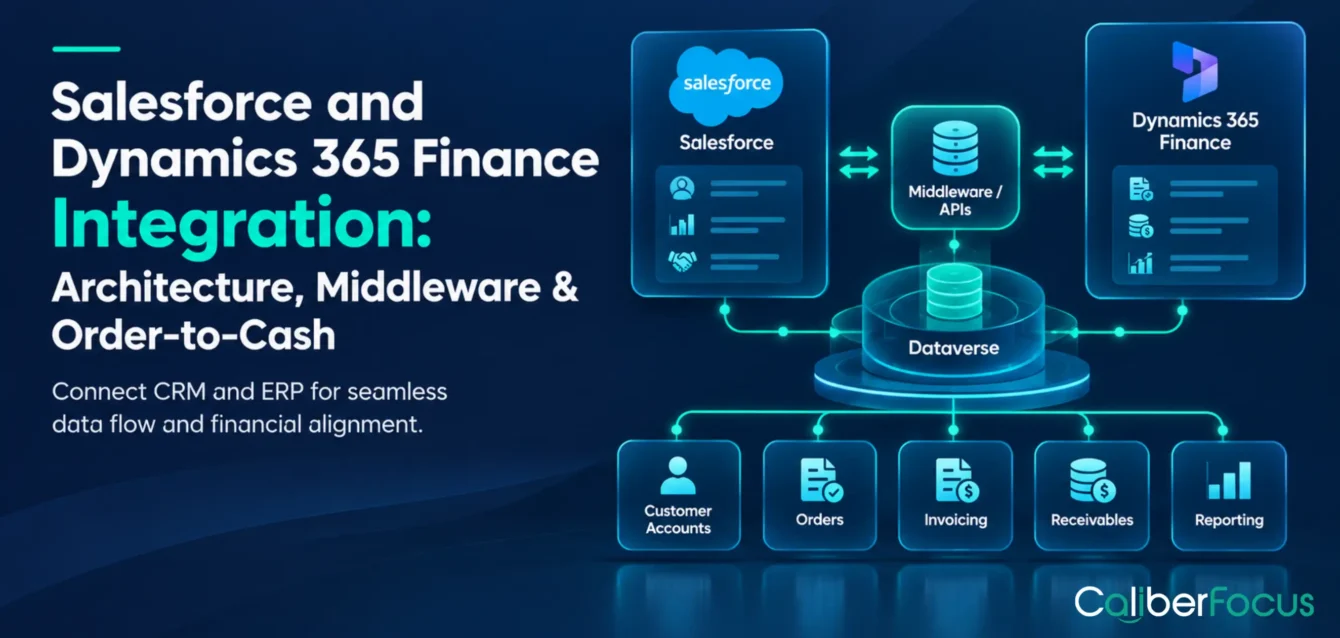
Salesforce manages customer relationships, sales opportunities, and commercial activities, while Microsoft Dynamics 365 Finance handles accounting, accounts receivable, and financial reporting. Without integration, sales and finance teams may rely on manual data transfers and separate reports to track transactions.
Salesforce and Microsoft Dynamics 365 Finance integration connects CRM and ERP information through APIs, connectors, or middleware. It enables customer details, approved transactions, and financial updates to move between applications while maintaining clear responsibilities for data and financial controls.
For enterprises considering Microsoft Dynamics 365 services, the priority is to establish reliable transaction handoffs, accurate information, and manageable integration costs.
Salesforce and Dynamics 365 Finance Integration at a Glance
| Integration area | Enterprise consideration |
|---|---|
| Purpose | Connect Salesforce commercial data with Dynamics 365 Finance processes |
| Business functions | Customer records, approved transactions, billing visibility, and reporting |
| Order-to-cash | Coordinate order handoffs, invoicing, and receivables information |
| Integration methods | APIs, supported connectors, or middleware |
| Data ownership | Define which system controls each record and update |
| Financial controls | Validate transactions, prevent duplicates, and reconcile exceptions |
| Implementation | Assess security, testing, costs, and ongoing support |
Business Benefits of Salesforce and Dynamics 365 Finance Integration
Integrating Salesforce with Dynamics 365 Finance can improve three areas of business operations.
Better Visibility into Sales and Revenue
Salesforce tracks opportunities and customer deals, while Dynamics 365 Finance records invoices, receivables, and financial transactions.
Integration allows authorized teams to access relevant financial updates alongside sales information. This helps leadership distinguish pipeline value, confirmed orders, invoiced amounts, and outstanding receivables rather than treating them as equivalent revenue measures.
Clearer Coordination Between Sales and Finance
An approved customer deal may require customer validation, order processing, and financial checks before invoicing.
Integration transfers the necessary information between applications, reducing manual handoffs while preserving financial approvals and accounting responsibilities.
Easier Management Across Business Entities
As enterprises expand across legal entities, regions, or applications, manually transferring customer and transaction information becomes harder to manage.
Integration can standardize data exchange, reduce duplicate entry, and make processing errors easier to identify.
The business objective is to improve information availability without compromising transaction accuracy or financial controls.
Business Functions Supported by Salesforce and Dynamics 365 Finance Integration
Salesforce ERP integration should support specific business activities rather than synchronize every available field.
| Business function | Integration capability | Business purpose |
| Customer information | Exchange customer identifiers and approved account updates | Match customer records across applications |
| Sales transactions | Transfer approved order information | Support downstream order and financial processing |
| Billing visibility | Return invoice and payment-status updates | Help sales teams respond to customer inquiries |
| Management reporting | Combine selected commercial and financial data | Compare sales activity with financial results |
| Cross-application coordination | Exchange information with other operational systems | Support processes spanning CRM, ERP, and order management |
An organization requiring only invoice visibility needs a different integration scope from one managing customer onboarding and order processing across several applications.
Data Ownership Across Salesforce and Dynamics 365 Finance
Information may be shared without allowing both systems to change it.
For example, Salesforce may own opportunity information, while Dynamics 365 Finance controls accounting entries and receivables. Customer master data, pricing, and order details require ownership rules based on the organization’s operating model.
Before integration, define:
- The authoritative system for each critical record.
- Which fields each application can update.
- How conflicting or incomplete records are resolved.
- Who can access customer financial information.
These rules reduce inconsistent updates and protect financial data from unintended changes.
Record ownership workflow
Ownership rules defined before implementation
Plan before implementation
Take Your Ownership Decisions to Project Kickoff
Define the owning system, permitted fields, conflict rules, and approver for every record before integration begins. Align your team on responsibilities from day one.
Discuss Your IntegrationStart the conversation with your integration requirements.
Salesforce Order-to-Cash Integration: From Sales Orders to Financial Transactions
Salesforce order-to-cash integration connects approved commercial transactions with order processing, invoicing, and accounts receivable activities.
Each stage needs a defined system responsibility and transaction reference.
| Process stage | Business activity | Integration requirement |
| Sales approval | Commercial terms are approved | Identify the approved transaction for handoff |
| Customer validation | Customer and financial details are checked | Match customer identifiers and required attributes |
| Order processing | An order enters the designated operational system | Transfer order details and preserve references |
| Financial processing | Applicable credit, accounting, and posting controls are applied | Pass validated information to the responsible application |
| Invoicing | An invoice is issued and recorded | Return relevant invoice details and status |
| Payment visibility | Receivables and payment records are updated | Share authorized payment-status information |
The process may also involve Dynamics 365 Supply Chain Management or a separate order management application. Dynamics 365 Finance should not be assumed to perform every operational order-processing function independently.
Defining the Right Transaction Handoff
A closed-won Salesforce opportunity is not necessarily ready for financial processing. Customer setup, pricing approval, or a formal sales order may still be required.
The integration should therefore use an approved business event, such as order acceptance, to initiate downstream processing.
A consistent transaction reference should connect the commercial record with subsequent orders and financial documents. This makes discrepancies easier to investigate without confusing opportunity status with completed financial activity.
Order-to-cash blueprint
Integration planning
Design the Handoff Before You Build It
Define approved events, transaction references, status returns, and failure paths for every order-to-cash stage before development begins. Align your teams on the workflow and exception handling.
Discuss Your IntegrationBring your workflow requirements to the CaliberFocus team.
Choosing the Right Salesforce–Dynamics 365 Finance Integration Approach
The appropriate architecture depends on the transactions being exchanged, processing requirements, and applications involved.
A Salesforce Dynamics 365 connector may support defined data exchanges, while direct APIs or middleware may be appropriate for requirements involving greater customization or coordination.
| Approach | Suitable requirement | Main consideration |
| Direct APIs | Specific exchanges between applications | Development, authentication, and error handling |
| Connectors | Supported customer, transaction, or reporting exchanges | Actual connector coverage, licensing, and limitations |
| Middleware | Multiple systems or complex transaction workflows | Orchestration, monitoring, and ongoing platform costs |
Aligning Integration Architecture with Business Requirements
A business that wants Salesforce users to view invoice and payment status from Dynamics 365 Finance may only need a supported connector or API integration.
The requirements change when Salesforce passes approved orders to an order management system, which then coordinates financial processing in Dynamics 365 Finance. These transactions need sequencing, validation, and recovery if a downstream application rejects an update.
The integration method should follow the workflow, not simply the number of systems connected.
Middleware for Complex Salesforce–Dynamics 365 Finance Workflows
Salesforce Dynamics 365 Finance middleware can be appropriate when several applications must exchange and process related transactions.
Its functions may include:
- Workflow coordination: Route transactions between applications in the required sequence.
- Data transformation: Map information between different application structures.
- Error recovery: Identify failures and support controlled retries.
- Centralized monitoring: Track processing status and exceptions.
Middleware also adds licensing, security, and maintenance responsibilities. A simpler integration may be preferable when the required exchange can be managed reliably without it.
Dynamics 365 Finance supports different integration mechanisms, including OData services and data-management APIs. Their suitability depends on the type, volume, and processing requirements of the data. Microsoft’s data management and integration documentation explains these options.
Integration architecture
Architecture decisions aligned with business requirements
Architecture review
Plan Your Salesforce–Dynamics 365 Finance Integration Around Business Requirements
Assess application dependencies, transaction handoffs, and financial controls before choosing an integration approach. Discuss your requirements with the CaliberFocus team in a focused architecture review.
Book a Free 45-Minute ReviewDiscuss your integration requirements and architecture priorities.
Financial Reconciliation and Transaction Accuracy
A successful data transfer does not always mean a financial transaction has been completed correctly.
An order may reach the destination application but fail validation. A repeated submission may create duplicate records. An invoice may be posted in Dynamics 365 Finance while its status update fails to reach Salesforce.
These failures require business-level monitoring, not just confirmation that an API responded successfully.
Key Financial Reconciliation Controls
Build reliable financial data flows with clear validation, exception handling, and traceability.
Transaction Completeness
Confirm that approved source transactions reach the intended destination and receive the expected outcome.
Duplicate Prevention
Use unique transaction references and processing checks to avoid unintended duplicate records.
Exception Management
Identify rejected, delayed, or incomplete transactions and assign responsibility for resolution.
Status Consistency
Match order, invoice, and payment updates to the correct records.
Auditability
Retain processing records needed to investigate financial discrepancies.
Measuring Integration Reliability
CIOs and CFOs should assess transaction outcomes alongside technical availability.
Useful measures include successful transaction processing rates, unresolved exceptions, duplicate incidents, and time taken to resolve failures.
For example, an integration may remain available throughout the day but still leave orders awaiting validation. Tracking unresolved transactions helps distinguish system availability from successful financial processing.
Order-to-cash gap review
For finance operations teams
Already Integrated, but Orders or Invoices Go Missing?
We review your transaction handoffs, duplicate checks, exception queues, and status returns, then identify which gaps put financial accuracy at risk first.
Discuss Your Reconciliation GapsContact CaliberFocus to discuss your existing integration and review needs.
Next: ERP budgeting
Dynamics 365 ERP Implementation Costs
Explore how configuration, customization, data migration, testing, and integration can affect your ERP investment.
Salesforce–Dynamics 365 Finance Integration Readiness Checklist
Before implementation, enterprises should confirm that business processes, application responsibilities, and operating requirements are documented.
| Evaluation area | Readiness requirement |
| Business scope | Identify the transactions and financial updates requiring integration |
| System ownership | Assign responsibility for critical records and changes |
| Data quality | Validate customer identifiers, required fields, and mappings |
| Processing | Define transaction volumes, timing, and application dependencies |
| Financial controls | Establish approvals, reconciliation, and exception handling |
| Security | Confirm authentication, access permissions, and data protection |
| Testing | Test successful transactions, failures, duplicates, and recovery |
| Support | Assign monitoring, maintenance, and incident responsibilities |
Integration Costs and Long-Term Maintenance
The cost of Salesforce and Dynamics 365 Finance integration depends on what the business needs to connect and how transactions move between applications. For example, displaying invoice status in Salesforce is generally less complex than integrating order processing, invoicing, and receivables across multiple legal entities.
Beyond the initial implementation, enterprises should account for three cost areas:
- Integration development: Connector configuration, API development, data mapping, and transaction validation.
- Licensing and infrastructure: Connector subscriptions, middleware platforms, and applicable usage-based charges.
- Ongoing maintenance: Monitoring failed transactions, updating integrations when applications change, and maintaining security and access controls.
These costs should be assessed alongside broader Dynamics 365 ERP implementation costs, particularly when integration is part of a larger ERP deployment.
The investment decision should consider both implementation costs and the resources needed to keep financial transactions processing reliably after go-live.
Frequently Asked Questions
Common questions about Salesforce and Dynamics 365 Finance integration, implementation costs, data synchronization, and security.
Is there a native connector between Salesforce and Dynamics 365 Finance?
There is no single native, preconfigured integration that covers every Salesforce-to-Dynamics 365 Finance workflow. Microsoft provides Finance integration capabilities, and third-party connectors are available. Verify support for the required Finance entities, operations, and transaction scenarios before selecting a connector.
Can Salesforce and Dynamics 365 Finance synchronize data in real time?
Near-real-time or event-driven exchange is possible for supported scenarios. Scheduled processing may be more appropriate for bulk updates or processes that do not require immediate information. The choice depends on transaction requirements, integration capabilities, and system limitations.
How much does Salesforce and Dynamics 365 Finance integration cost?
Costs vary by integration method, data volume, workflow complexity, licensing, customization, and testing. Recurring expenses may include connector subscriptions, middleware licensing, monitoring, and maintenance. A credible estimate requires a defined scope and review of both applications.
What security requirements apply to Salesforce and Dynamics 365 Finance integration?
Enterprises should use appropriate authentication, encrypted communication, and access permissions limited to required data and operations. Financial information should be available only to authorized users and systems. Integration identities, activity logs, and recovery procedures should also be reviewed before deployment.
Key Takeaways
- Salesforce and Dynamics 365 Finance integration connects commercial and financial information while preserving system responsibilities.
- Customer records, order transactions, billing updates, and reporting require clearly defined exchange rules.
- Order-to-cash integration depends on approved transaction handoffs and accurate references across applications.
- Connectors, APIs, and middleware should be evaluated against workflow complexity and maintenance requirements.
- Financial reconciliation and exception monitoring help verify that transactions are processed correctly.
- Implementation planning must address data quality, security, testing, costs, and operational ownership.

Continue Reading
Dynamics 365 Finance vs. Business Central
Compare features, financial complexity, implementation scope, and business requirements to identify the right ERP for your organization.
Explore ArticleDynamics 365 vs. NetSuite
Explore the key differences between these ERP platforms, including business capabilities, scalability, and implementation considerations.
Explore ArticleBenefits of Microsoft Dynamics 365 for Enterprises
Discover how Dynamics 365 can connect business operations, support automation, improve insights, and enable enterprise growth.
Explore Article