

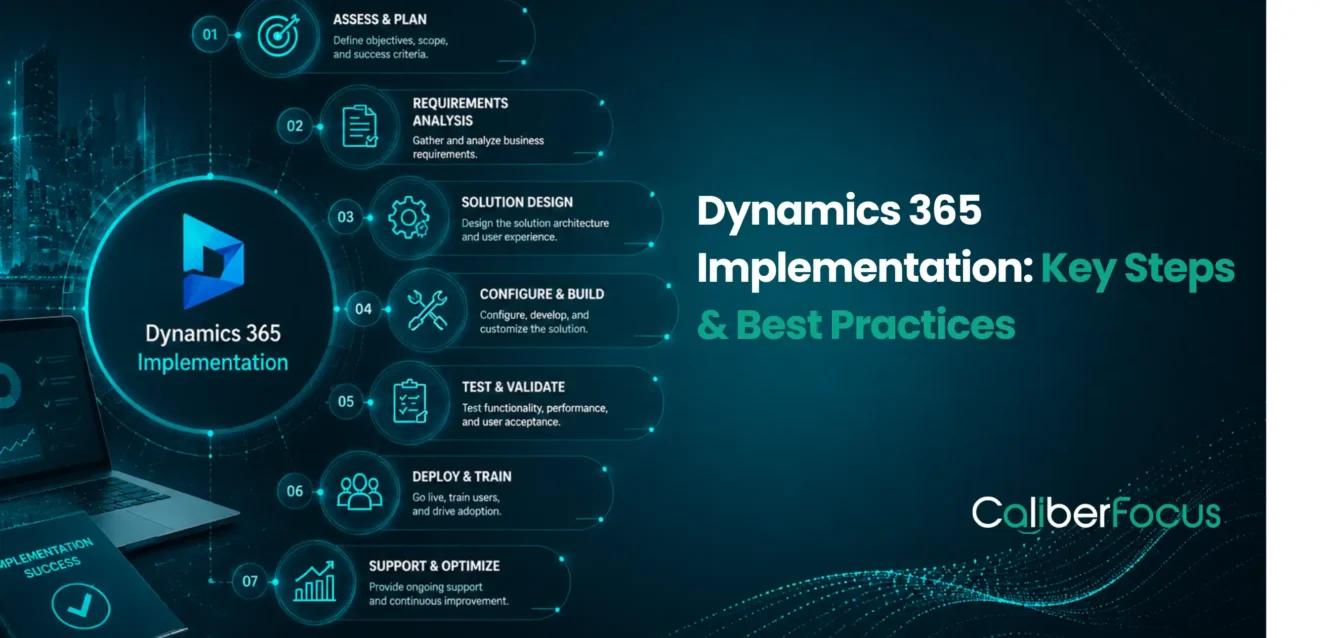
A successful Microsoft Dynamics 365 implementation starts with clear decisions about business processes, applications, data, integrations, users, and long-term support. Each of these areas affects how well the platform fits the organization and how effectively teams can use it after go-live.
For an enterprise implementation, the core work typically includes:
- Defining business goals and implementation scope
- Assessing and optimizing existing processes
- Selecting the right Dynamics 365 applications and modules
- Planning data migration and system integration
- Deciding where configuration, customization, or Power Platform extensions are appropriate
- Testing the solution with technical teams and business users
- Preparing employees for new processes and applications
- Establishing a post-go-live support and optimization plan
These decisions form the foundation of a practical Dynamics 365 implementation strategy. They also influence the implementation timeline, cost, technical complexity, and adoption outcomes.
This Dynamics 365 implementation guide explains the key steps and best practices organizations should consider across the implementation lifecycle, from initial planning and solution design through migration, testing, deployment, Copilot and AI readiness, and ongoing optimization.
Define the Right Approach for Your Implementation
Align your business priorities, processes, data, integrations, and technology decisions with a practical approach for your Dynamics 365 journey.
What Is a Dynamics 365 Implementation?
A Dynamics 365 implementation is the process of designing, configuring, integrating, testing, and deploying Microsoft Dynamics 365 to support an organization’s business operations. The implementation is shaped around the company’s processes, data, users, applications, security requirements, and reporting needs.
For an enterprise, the implementation typically covers several connected areas:
- Business process design: Reviewing current workflows and defining how they should operate in Dynamics 365.
- Application and module selection: Determining which Dynamics 365 applications and modules are required based on business functions and operational priorities. This may include ERP capabilities covered through Dynamics 365 ERP services, depending on the organization’s operational requirements.
- Solution configuration: Setting up standard Dynamics 365 capabilities, workflows, business rules, security roles, and other platform features.
- Data migration: Preparing, cleansing, mapping, validating, and transferring data from existing systems into Dynamics 365.
- System integration: Connecting Dynamics 365 with other enterprise applications, data sources, and business systems where required.
- Customization and extensions: Identifying where standard functionality is sufficient and where extensions or Power Platform services are appropriate for specific business requirements.
- Testing and validation: Verifying that the solution works technically and supports real business scenarios before deployment.
- User adoption: Preparing employees through training, communication, process guidance, and change management.
- Deployment and support: Managing go-live activities, resolving early-stage issues, and establishing a plan for ongoing optimization.
The scope can vary significantly depending on the Dynamics 365 applications being implemented, the complexity of existing systems, the quality of source data, integration requirements, regulatory considerations, and the number of business units involved.
A practical Dynamics 365 implementation guide should therefore address both technology and business operations. Decisions made during process design, data migration, customization, testing, and deployment can directly affect implementation cost, timeline, adoption, and long-term maintainability.
The next step is to establish the implementation practices that help organizations manage these decisions effectively.
15 Dynamics 365 Implementation Best Practices
15 Dynamics 365 Implementation Best Practices
Practical considerations for planning, implementing, deploying, and continuously improving your Dynamics 365 environment.
Define Business Outcomes
Assess & Optimize Processes
Choose the Right Applications
Establish Implementation Governance
Build the Implementation Roadmap
Prepare & Govern Data
Design Solution Architecture & Integrations
Use Standard Capabilities Before Customizing
Plan Security Roles & Access
Build a Structured Testing Strategy
Prepare Users & Manage Change
Plan Deployment & Go-Live Readiness
Prepare for Copilot & AI
Establish Post-Go-Live Support
Measure Success & Continue Improving
1. Define Business Outcomes Before Starting the Implementation
A Dynamics 365 implementation should begin with clearly defined business outcomes. Before deciding which features to configure or which modules to deploy, organizations should identify the operational problems the implementation needs to address and the results the business expects to achieve.
Start by defining:
- Business priorities: What needs to improve through the implementation?
- Process objectives: Which workflows need to become more efficient, standardized, or easier to manage?
- Key performance indicators: How will the organization measure whether the implementation is delivering the expected results?
- Implementation scope: Which business units, processes, applications, and users are included in the initial rollout?
- Business ownership: Which stakeholders are responsible for decisions, approvals, and success criteria?
For example, an organization may have goals such as improving financial visibility, standardizing processes across business units, reducing manual data entry, strengthening customer-service operations, or creating better access to operational data. These outcomes provide a basis for determining what the Dynamics 365 solution should prioritize.
This is where a structured Dynamics 365 consulting and strategy approach can help align business requirements with the right solution architecture before implementation begins. Dynamics 365 Consulting Services
Create Measurable Implementation Objectives
Business goals should be translated into measurable implementation objectives. Instead of defining success as simply “going live with Dynamics 365,” establish criteria that can be evaluated after deployment.
| Business Goal | Implementation Objective | Example Measure |
| Improve financial visibility | Standardize financial reporting and processes | Reporting cycle time |
| Reduce manual work | Automate repetitive workflows | Manual processing effort |
| Improve customer operations | Centralize customer and service information | Case resolution time |
| Improve data quality | Establish governed master data processes | Data error rate |
| Support business growth | Create a scalable application and integration architecture | New business unit onboarding effort |
These objectives also provide a reference point for later decisions around configuration, customization, data migration, integrations, testing, and user adoption.
A clearly defined outcome framework helps implementation teams maintain scope discipline. It also gives business leaders a practical way to evaluate whether the Dynamics 365 investment is achieving its intended purpose after go-live.
2. Assess and Optimize Business Processes Before Configuration
Before configuring Dynamics 365, review how each critical business process works today. The goal is to identify unnecessary steps, manual work, duplicate activities, approval delays, and process variations that could affect the new solution.
A practical process review should answer three questions:
| Question | What to Examine |
| What happens today? | Process steps, roles, approvals, systems used, and handoffs |
| What needs to improve? | Manual tasks, duplicate entry, bottlenecks, workarounds, and inconsistent processes |
| What should happen in Dynamics 365? | Standardized workflows, automation opportunities, required controls, and clear ownership |
Standardize Before You Customize
Not every existing process needs to be reproduced in Dynamics 365. Where a process can be simplified or standardized without affecting legitimate business requirements, make that decision before configuration begins.
A useful approach is:
Keep processes that already work well → Simplify unnecessary steps → Standardize valid variations → Automate repetitive activities → Customize only where a genuine business requirement remains.
This process assessment provides the foundation for configuration decisions and helps prevent unnecessary customization. Organizations can also use Business Process Optimization Services to identify process improvement opportunities before translating requirements into the Dynamics 365 solution. Business Process Optimization Services
The final output should be a documented future-state process that defines the activities, users, approvals, business rules, and system interactions to be supported in Dynamics 365.
3. Choose the Right Dynamics 365 Applications and Modules
The right Dynamics 365 applications should be selected based on business processes, functional requirements, and implementation priorities. Starting with a list of products or features can lead to unnecessary scope and added implementation complexity.
Evaluate each business area against four factors:
- Business requirement: What process or operational need must the application address?
- Functional fit: Can standard Dynamics 365 capabilities support the requirement?
- Integration needs: What existing systems and data sources need to connect with the application?
- Implementation priority: Is the capability required for the initial go-live or better suited to a later phase?
For example, organizations with complex financial, supply chain, or operational requirements may evaluate Dynamics 365 ERP services as part of their ERP strategy. Organizations focused on sales and customer operations may require Dynamics 365 Customer Engagement applications, while specific business processes may be extended through Power Platform.
The implementation scope should then define which applications and modules are included in the initial rollout, which are planned for later phases, and which requirements will remain outside the Dynamics 365 solution.
This approach keeps the Dynamics 365 implementation strategy aligned with actual business priorities and provides a clear basis for solution design, budgeting, integration planning, and deployment.
4. Establish an Implementation Governance Model
A clear governance model keeps a Dynamics 365 implementation aligned with business priorities as decisions, risks, and requirements evolve. It should define who owns key decisions, who approves changes, and how issues are escalated.
At a minimum, establish:
- Executive ownership: A business sponsor who provides direction and resolves high-level conflicts.
- Implementation leadership: A project or program lead responsible for coordinating business, functional, and technical teams.
- Business ownership: Process owners who validate requirements and approve future-state processes.
- Technical ownership: Solution and integration leads who oversee architecture, security, data, and technical decisions.
- Decision authority: A defined path for approving scope changes, customizations, integrations, and other significant solution decisions.
Control Scope And Changes
New requirements will often emerge during an implementation. Each request should be evaluated against its business value, implementation effort, dependencies, risk, and impact on the timeline before it is approved.
Maintain a simple decision and change log covering:
Requirement → Business owner → Decision → Impact → Approval
This gives project teams a consistent basis for managing scope and helps prevent individual requirements from driving unplanned changes to the Dynamics 365 solution.
Governance should continue through design, configuration, testing, deployment, and post-go-live support. Regular reviews of risks, decisions, dependencies, and open issues help keep the implementation moving toward its agreed business outcomes.
5. Build a Realistic Dynamics 365 Implementation Roadmap
A Dynamics 365 implementation roadmap should show how the project will move from planning to go-live, including the work that must happen at each stage and the dependencies between them.
A practical roadmap should define:
| Roadmap Element | What It Should Cover |
| Phases | Discovery, design, configuration, migration, testing, deployment, and post-go-live support |
| Milestones | Key approvals, completed workstreams, testing completion, and go-live readiness |
| Dependencies | Activities that must be completed before another workstream can begin |
| Resources | Business, functional, technical, data, and project teams required at each stage |
| Go-Live Scope | Capabilities that must be ready for the initial deployment |
| Contingency | Time for unexpected data, integration, testing, or business-process issues |
The roadmap should also distinguish between go-live requirements and later-phase improvements. Moving every requested capability into the first release can increase project complexity and make the implementation timeline difficult to control.
For example, data migration must be planned early because data mapping and cleansing can affect configuration and testing. Integrations should also be designed early so their dependencies are reflected in the overall schedule.
A realistic roadmap gives business and technical teams a shared view of what needs to happen, when it needs to happen, and what depends on it. It also provides a baseline for tracking progress and evaluating changes to the implementation timeline.
6. Prepare and Govern Data Before Migration
Data migration should be planned before configuration and testing are finalized. Poor-quality or unnecessary data can create errors in the new Dynamics 365 environment and complicate validation.
Before migration, define:
- What to migrate: Identify the master, transactional, historical, and reference data required for go-live.
- What to clean: Remove duplicates, correct inaccurate records, and resolve missing or inconsistent values.
- How to map: Map source-system fields and values to the corresponding Dynamics 365 structures.
- Who owns it: Assign business owners responsible for approving data definitions and migration results.
- How to validate: Reconcile migrated data and test it against real business scenarios.
Not all legacy data needs to be moved. Migration scope should be based on business use, reporting requirements, retention obligations, and the needs of the future-state solution.
Run migration through multiple test cycles before go-live. Each cycle should validate data accuracy, mapping, transformation, and reconciliation.
For complex migration requirements, Dynamics 365 Migration Services can support data assessment, transformation, migration, and validation activities. Dynamics 365 Migration Services
7. Design the Solution Architecture and Integration Strategy
A Dynamics 365 implementation strategy should define how Dynamics 365 will fit within the organization’s existing technology environment. Before development begins, identify the systems that need to connect, the data they exchange, and the role each system will play.
Focus on:
- System boundaries: Define which processes Dynamics 365 will manage and which remain in existing applications.
- Integration requirements: Identify the applications, APIs, and external systems that need to connect with Dynamics 365.
- Data ownership: Establish which system is the source of truth for key business data.
- Integration approach: Determine whether each integration requires real-time, scheduled, or event-based data exchange.
- Exception handling: Define how failed transactions and integration errors will be monitored and resolved.
Document Integration Requirements Early
Create a simple integration map before development to capture the source system, target system, data exchanged, integration frequency, and ownership for each connection.
This helps teams identify dependencies early, supports more effective Dynamics 365 integration, and reduces the risk of technical issues emerging late in the implementation.
The resulting architecture should provide a clear foundation for configuration, development, data movement, and testing while remaining flexible enough to support future business requirements.
8. Use Standard Dynamics 365 Capabilities Before Customizing
A key Dynamics 365 implementation best practice is to use standard platform capabilities wherever they meet the business requirement. Customization should be considered when a genuine business need cannot be addressed effectively through standard functionality or supported extensions.
Before approving a customization, evaluate:
- Business need: Is the requirement essential to the business process?
- Standard functionality: Can it be addressed through existing Dynamics 365 capabilities or configuration?
- Extension options: Can Power Platform or another supported extension approach meet the requirement?
- Long-term impact: How will the customization affect upgrades, maintenance, testing, and future changes?
Keep Customization Purposeful
Avoid reproducing every existing process or workaround in Dynamics 365 simply because it exists in the legacy environment. First determine whether the process can be simplified, standardized, or supported through configuration.
When Dynamics 365 customization is necessary, document its purpose, dependencies, ownership, and expected maintenance requirements. This helps prevent unnecessary technical complexity and keeps the solution easier to manage as the platform evolves.
The objective is not to eliminate customization entirely, but to ensure that every customization has a clear business justification and a sustainable role within the overall solution.
9. Plan Security Roles and Access Early
Security should be addressed during solution design rather than after the Dynamics 365 environment has been configured. Define who can access each application, what information they need, and which business activities they are authorized to perform.
A practical access model should consider:
- User roles: Map users to the business functions and activities they need to perform.
- Permissions: Provide access based on job responsibilities rather than broad system access.
- Segregation of duties: Separate sensitive activities such as transaction entry, approval, and financial authorization where required.
- Data access: Determine whether access needs to vary by business unit, department, legal entity, or other organizational boundaries.
- Access reviews: Establish a process for reviewing and updating permissions as employees change roles or leave the organization.
Validate Access With Business Teams
Security roles should be tested against real business scenarios before go-live. Business owners can verify whether users have the access required to complete their responsibilities without receiving unnecessary permissions.
Addressing these requirements early helps reduce access issues during deployment and creates a more controlled Dynamics 365 environment. It also ensures that security decisions remain aligned with the organization’s operational and compliance requirements throughout the Dynamics 365 implementation process.
10. Build a Structured Testing Strategy
Dynamics 365 testing should validate both the technical solution and the business processes it is designed to support. Testing should begin early and continue across configuration, integrations, data migration, and business scenarios rather than being treated as a final step before go-live.
A practical testing approach should cover:
- Functional testing: Verify that configured Dynamics 365 processes and business rules work as expected.
- Integration testing: Confirm that data moves correctly between Dynamics 365 and connected systems.
- Data validation: Check that migrated data is accurate, complete, and usable within business processes.
- User acceptance testing: Allow business users to validate real-world scenarios and confirm that the solution meets operational requirements.
- Regression testing: Revalidate existing functionality after significant configuration or development changes.
Test Real Business Scenarios
Testing should reflect how employees will actually use Dynamics 365. Instead of validating individual features in isolation, create end-to-end scenarios that cover activities such as transactions, approvals, reporting, integrations, and exception handling.
Document test results, track defects, assign ownership, and retest resolved issues before moving toward deployment.
A structured testing process helps identify functional, data, and integration issues early and gives business stakeholders greater confidence that the Dynamics 365 solution is ready for go-live.
11. Prepare Users and Manage Change
A Dynamics 365 implementation changes how employees perform daily tasks, access information, and interact with business processes. Preparing users early can help reduce disruption during deployment and support faster adoption after go-live.
A practical change management approach should include:
- Stakeholder involvement: Engage key users and process owners during solution design and testing.
- Role-based training: Provide training based on the tasks and responsibilities of each user group.
- Process guidance: Document important process changes, workflows, and new responsibilities.
- Communication: Clearly explain what is changing, when it is changing, and how it affects employees.
- User feedback: Create channels for users to raise concerns, identify gaps, and provide feedback before deployment.
Prepare Users Before Go-Live
Training should be based on the final Dynamics 365 configuration and real business scenarios rather than generic product demonstrations. Business users should have an opportunity to practice key processes and understand how their responsibilities will change.
A structured user-readiness plan helps organizations identify adoption issues before deployment and gives employees the knowledge needed to work effectively with the new solution from day one.
12. Plan Deployment and Go-Live Readiness
A well-planned deployment brings together the work completed across configuration, data migration, integrations, testing, and user preparation. Before setting a go-live date, confirm that the solution, users, data, and supporting processes are ready for production.
A practical go-live review should confirm:
- Solution readiness: Required configurations, customizations, and integrations are completed and validated.
- Data readiness: Final migration activities, reconciliation, and data validation are complete.
- User readiness: Key users have completed training and understand the processes they will follow after deployment.
- Operational readiness: Support contacts, issue-management procedures, and escalation paths are established.
- Deployment plan: Cutover activities, responsibilities, dependencies, and rollback considerations are clearly documented.
Set the Go-Live Date Based on Readiness
The Dynamics 365 implementation timeline should be driven by actual readiness rather than an arbitrary target date. If critical data, integration, testing, or user-readiness activities remain unresolved, the impact should be assessed before proceeding with deployment.
A controlled cutover plan should define the sequence of final data migration, system changes, validation, user access, and production activation. Assigning clear ownership to each activity helps teams coordinate the transition and respond quickly to issues.
A readiness-based approach reduces last-minute disruption and provides a clearer path from implementation completion to a stable Dynamics 365 production environment.
13. Prepare for Copilot and AI in Dynamics 365
AI capabilities should be considered as part of the Dynamics 365 implementation rather than added after deployment. Organizations should identify where AI in Dynamics 365 can support business users, automate repetitive activities, improve insights, or assist with decision-making.
Before introducing Copilot capabilities, evaluate:
- Business use cases: Identify processes where AI can provide practical value.
- Data readiness: Ensure the required business data is accurate, accessible, and appropriately governed.
- User roles: Determine which users and teams can benefit from Copilot capabilities.
- Security and access: Confirm that AI experiences follow existing permissions and data-access policies.
- Adoption requirements: Prepare users to understand where Copilot can assist and where human review remains necessary.
Align Copilot With Business Processes
A Dynamics 365 Copilot implementation should start with specific business scenarios rather than introducing AI features without a defined purpose. For example, teams may evaluate Copilot capabilities for customer interactions, financial operations, reporting, workflow assistance, or other processes supported by their Dynamics 365 applications.
Organizations should also assess the data, configuration, security, and licensing requirements associated with the selected capabilities before deployment.
For organizations planning to extend Dynamics 365 with AI capabilities, Dynamics 365 Copilot and AI services can be considered as part of the broader implementation and transformation strategy.
Preparing for Copilot early allows teams to incorporate AI use cases into solution design, user training, security planning, and future optimization rather than treating them as a separate initiative after go-live.
14. Establish Post-Go-Live Support and Optimization
Going live with Dynamics 365 is not the end of the implementation. The initial weeks and months after deployment are important for resolving issues, monitoring system performance, addressing user feedback, and identifying areas for improvement.
A post-go-live support plan should include:
- Issue resolution: Track and prioritize functional, technical, data, and integration issues.
- User support: Provide clear channels for users to report problems and receive assistance.
- Performance monitoring: Review system performance and identify recurring issues that require attention.
- Process optimization: Evaluate whether business processes are working as intended after users begin working in the live environment.
- Enhancement planning: Prioritize improvements based on business value, user feedback, and changing requirements.
Move From Stabilization to Continuous Improvement
The initial support period should focus on stabilizing the solution and resolving critical issues. Once the environment is stable, organizations can establish a regular review cycle to evaluate new requirements, platform updates, automation opportunities, and process improvements.
Working with a capable Dynamics 365 implementation partner can provide continuity across implementation, stabilization, and ongoing optimization. Where ongoing assistance is required, Dynamics 365 implementation services can extend beyond deployment to support evolving business and technology requirements.
A structured post-go-live approach helps organizations keep the Dynamics 365 environment aligned with business needs instead of treating implementation as a one-time technology project.
15. Measure Implementation Success and Continue Improving
A successful Dynamics 365 implementation should be measured by business outcomes, not simply by whether the system goes live on schedule. The organization should establish clear measures to evaluate whether the new solution is improving processes, supporting users, and delivering the expected business value.
Track areas such as:
- Process performance: Monitor improvements in cycle times, workflow efficiency, and process consistency.
- User adoption: Review system usage, training needs, and recurring user challenges.
- Data quality: Monitor data accuracy, completeness, and consistency across key business processes.
- System performance: Track recurring technical, integration, and operational issues.
- Business outcomes: Compare post-implementation results against the objectives established during planning.
Review and Optimize the Solution Regularly
The Dynamics 365 implementation process should not end with the initial deployment. Establish regular reviews to assess business performance, user feedback, new requirements, platform capabilities, and opportunities for automation or process improvement.
Use these reviews to determine which improvements should be addressed immediately, which can be planned for future releases, and which requirements no longer provide sufficient business value.
A structured measurement and optimization cycle helps organizations get more value from their Dynamics 365 investment and keeps the solution aligned with changing business priorities. These practices also provide a practical foundation for organizations using this Dynamics 365 implementation guide to plan, execute, and continuously improve their implementation strategy.
Common Dynamics 365 Implementation Challenges
Identifying common implementation risks early helps teams protect project timelines, manage complexity, and maintain business readiness throughout the Dynamics 365 journey.
Unclear Requirements & Scope
Incomplete requirements or frequent scope changes can create rework, increase effort, and disrupt the implementation roadmap.
Poor-Quality Legacy Data
Duplicate, incomplete, or inconsistent records can complicate Dynamics 365 data migration and affect business processes after go-live.
Complex System Integrations
Multiple connected applications can introduce technical dependencies that require careful integration design, development, and testing.
Excessive Customization
Unnecessary Dynamics 365 customization can increase technical complexity, maintenance effort, and future upgrade requirements.
Limited Business Involvement
Limited participation from process owners and business users can leave important operational gaps unresolved until late in the implementation.
User Adoption Challenges
Without effective training, communication, and change management, employees may struggle with new workflows and responsibilities.
Unrealistic Implementation Timelines
Timelines that overlook migration, integrations, testing, business availability, and deployment activities can create avoidable project pressure.
Address Risks Before Go-Live
Clear ownership, early risk identification, and structured planning help teams control scope, protect timelines, and improve deployment readiness.
Address Risks Before They Affect Go-Live
Most implementation challenges become more manageable when they are identified during planning rather than after deployment. Maintaining clear ownership of requirements, data, integrations, testing, and user readiness allows teams to track risks and make informed decisions throughout the implementation.
A structured approach to risk management helps organizations protect the Dynamics 365 implementation timeline, control scope, and create a smoother transition to the new environment.
Benefits of a Well-Planned Dynamics 365 Implementation
A structured implementation helps organizations build consistent processes, connected systems, reliable data, and a foundation for long-term growth.
Standardized Processes
Consistent workflows, approvals, and business rules reduce process variations across teams and business units.
Better Data Visibility
Connected and governed business data supports more reliable reporting and informed decision-making.
Connected Systems
Effective Dynamics 365 integration connects core applications and helps reduce information silos.
Simpler Operations
Process assessment and automation can reduce unnecessary steps and repetitive manual activities.
Scalable Operations
A well-designed solution can support new users, business units, and changing requirements over time.
AI Readiness
Reliable data, structured processes, and appropriate security create a stronger foundation for AI in Dynamics 365 and Copilot.
Build a Dynamics 365 Environment That Can Evolve
A well-planned implementation provides a foundation that organizations can continuously improve as business and technology requirements change.
What Affects Dynamics 365 Implementation Cost?
There is no fixed Dynamics 365 implementation cost because each project differs in scope, business requirements, data, integrations, and level of customization. The total investment depends on the work required to design, configure, migrate, test, deploy, and support the solution.
The main cost factors include:
- Implementation scope: The number of Dynamics 365 applications, modules, business processes, users, and business units included in the project directly affects the overall implementation effort.
- Data migration: The volume, quality, transformation requirements, and number of legacy systems involved in Dynamics 365 data migration can increase migration and validation effort.
- Integration requirements: Connecting Dynamics 365 with ERP, CRM, financial, operational, or third-party systems can add architecture, development, testing, and maintenance requirements.
- Customization: Complex or business-specific Dynamics 365 customization can require additional design, development, testing, documentation, and ongoing maintenance.
- Testing and training: The number of testing cycles, business-user involvement, training requirements, and change-management activities can influence the implementation effort.
- Support requirements: Post-go-live support, optimization, managed services, and future enhancements should also be considered when estimating the overall investment.
Estimate Cost Based on Scope
A reliable estimate should be developed after understanding the organization’s requirements, implementation scope, data environment, integrations, customization needs, and deployment approach. Comparing providers only on an initial project price can overlook important activities that affect the final investment.
A detailed scope assessment gives organizations a clearer view of Dynamics 365 implementation cost and helps establish a realistic budget before implementation begins.
Conclusion
A successful Dynamics 365 implementation depends on more than deploying the platform. Clear business objectives, process alignment, reliable data, well-planned integrations, appropriate customization, structured testing, user readiness, and post-go-live optimization all contribute to a sustainable solution.
Following the right Dynamics 365 implementation best practices helps organizations manage complexity, control implementation risks, and build a solution that can evolve with changing business requirements.
Ready to Plan Your Dynamics 365 Implementation?
Bring your business requirements, processes, data, and integrations together with a clear implementation approach built around your priorities.
Frequently Asked Questions
The key steps include defining business objectives, assessing processes, selecting applications, designing the solution, preparing data, planning integrations, configuring the platform, testing, training users, deploying the solution, and providing post-go-live support.
The Dynamics 365 implementation timeline depends on factors such as project scope, applications involved, data migration, integrations, customization, testing requirements, and business-user availability. A detailed assessment is needed to establish a realistic timeline.
Dynamics 365 implementation cost is influenced by the number of applications and users, implementation scope, data migration complexity, integrations, customization, testing, training, and post-go-live support requirements.
Common challenges include unclear requirements, poor-quality legacy data, complex integrations, excessive customization, limited business involvement, user adoption issues, and unrealistic implementation timelines.
Evaluate a Dynamics 365 implementation partner based on relevant implementation experience, business-process expertise, integration and data migration capabilities, customization approach, testing methodology, user adoption support, and post-go-live services.
Customization should be considered when a genuine business requirement cannot be addressed effectively through standard Dynamics 365 functionality or supported extension options. Each customization should have a clear business justification and long-term maintenance plan.
