


Dynamics 365 unifies revenue cycle management by connecting all six operational stages into a single shared data environment where each stage feeds the next without manual handoffs: patient access, coding and charge capture, claims management, denials management, AR management, and payment posting.
Most healthcare organizations run these six stages on separate platforms. Re-entering registration data into a billing system, manually routing denials to the correct team queue, or reconciling AR reports pulled from three disconnected tools are data architecture failures. Dynamics 365 resolves this by functioning as the shared operational layer underneath all six stages, not as a tool added on top of existing ones.
This blog walks through how that architecture works at each stage of the revenue cycle and how CaliberFocus configures it for hospital-grade RCM operations. For a platform-level overview of how Dynamics 365 transforms healthcare revenue cycle management, our companion guide covers the broader outcomes and ROI.
THE CORE PROBLEM : Why RCM Fragmentation Persists Even After Automation
The six stages of revenue cycle management do not fail individually. They fail because they do not share data with each other.
Most hospitals have applied automation at isolated points in the cycle. Eligibility verification runs through one tool. Claims submission goes through another. Denial tracking lives in a third platform. Each tool automates within its own boundary, but staff still move data manually between those boundaries. That handoff is where revenue leaks.
Industry research consistently shows that the majority of claim denials trace back to front-end data errors at patient registration, information that was never validated against payer requirements before the clinical service was provided. By the time that denial reaches the billing team, three separate systems and two staff members have already touched that record. These are precisely the Dynamics 365 implementation challenges in healthcare that a connected data architecture is designed to close.
“When eligibility data is validated at registration and carried forward automatically, the most preventable category of denials disappears before the claim is ever filed.”
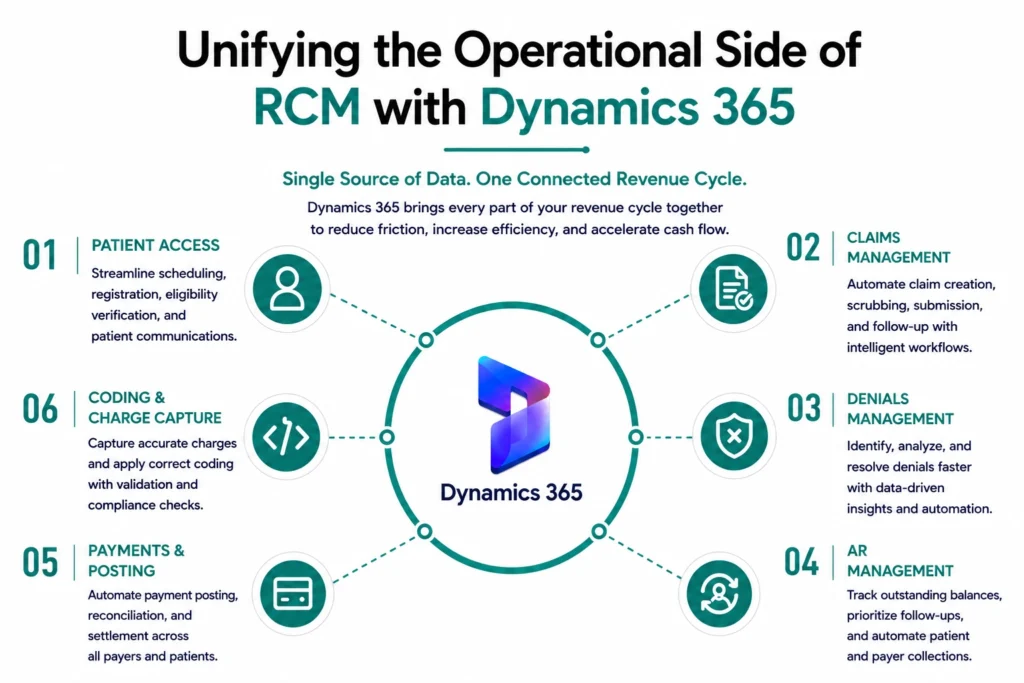
OPERATIONAL ARCHITECTURE : The Six RCM Stages Dynamics 365 Connects in One Environment
Each stage of the revenue cycle generates data that the next stage depends on, and Dynamics 365 makes that dependency automatic rather than manual.
The platform replaces the gaps between systems with a unified data environment configured to the operational requirements of each stage. From Dynamics 365 for healthcare finance and claims management through denial tracking and payment posting, all six functions read from and write to the same shared record.
| RCM Stage | What Dynamics 365 Does | Module |
| Patient Access | Real-time eligibility verification against payer rules at registration | Customer Insights + Power Automate |
| Coding & Charge Capture | AI-assisted code validation with automated charge routing | Copilot for Dynamics + Finance Ops |
| Claims Management | Payer-specific claim build, clean claim checks, automated submission | Finance & Operations |
| Denials Management | Denial classification, appeal workflow routing, root cause tagging | Power Automate + Power BI |
| AR Management | AR aging queue with automated follow-up triggers by payer and balance band | Finance & Operations |
| Payments & Posting | Automated ERA posting with exception flagging for manual review | Finance & Operations |
WORKFLOW IN PRACTICE: How a Single Claim Moves Through Dynamics 365 From Registration to Posting
A clean claim does not start at claims management. It starts at patient access, and Dynamics 365 treats every stage between those two points as one connected arc.
- Registration. Power Automate runs eligibility verification against configured payer rules before the appointment ends. A verified record, including demographics, payer ID, and coverage tier, carries forward to the coding stage without re-entry.
- Coding. Copilot for Dynamics validates codes against the patient’s clinical documentation, flagging procedure-to-diagnosis mismatches before the charge is captured. The validated charge routes automatically into the claims queue.
- Claims. Finance and Operations applies payer-specific rules for claim format, attachment requirements, and submission timing. No staff input is needed for claims that pass the clean claim check.
- Denials. When a denial returns, Power Automate classifies it by reason code and routes the appeal task to the correct team queue. The original claim, denial reason, and payer appeal deadline are already attached, with all data handling meeting the Dynamics 365 security and compliance requirements in RCM.
- AR and Posting. The Power BI AR aging dashboard updates in real time as the appeal progresses. Once resolved, Finance and Operations completes ERA posting automatically, flagging exceptions for manual review only.
WHY CALIBERFOCUS: What CaliberFocus Configures That Dynamics 365 Does Not Ship With
Dynamics 365 provides the platform architecture. CaliberFocus provides the healthcare RCM configuration that makes it operational as a revenue cycle system from day one.
Out of the box, Dynamics 365 is an enterprise platform with the data infrastructure, automation engine, and AI layer that a revenue cycle system requires. The healthcare-specific configuration (payer claim rules, denial taxonomies, AR aging thresholds, coding validation logic) is built during implementation. CaliberFocus structures that work across three delivery phases.
- Consult and Transform Process mapping your current RCM workflow against Dynamics 365 capabilities before any configuration decision is made. Includes Dynamics 365 consulting and strategy and business process optimization for organizations migrating from Salesforce, SAP, or legacy billing tools.
- Implement and Run Building the ERP and Finance Operations layer, activating Power Platform and Power Automate for denial and AR workflows, and integrating existing EHR data into the unified environment so staff work from one system rather than switching between platforms.
- Extend and Optimize Adding Copilot and AI integration for Dynamics for coding validation and denial pattern detection, and providing managed services so the configuration adapts as payer contracts change and denial patterns shift.
Frequently Asked Questions
Dynamics 365 operates as a shared data environment across all six RCM stages rather than as an isolated billing tool. Every stage reads from and writes to the same system, removing the re-entry and manual reconciliation that standard billing platforms require at each handoff point. The result is a revenue cycle that moves data forward without staff intervention between stages.
The four primary modules are Finance and Operations for claims processing and AR management, Power Automate for denial routing and eligibility workflows, Power BI for real-time RCM performance dashboards, and Copilot for Dynamics for AI-assisted code validation and denial pattern detection across payer categories.
Yes. CaliberFocus builds interoperability layers between Dynamics 365 and major EHR platforms including Epic, Cerner, and Allscripts. The integration maps clinical data from the EHR directly into the coding and claims workflow in Dynamics 365 so staff do not need to operate across two separate systems simultaneously.
Most organizations complete the core Finance and Operations and Power Automate configuration in 12 to 20 weeks. Copilot and AI layer activation is typically scoped as a second phase once the base workflow is live and producing clean performance data for calibration.
CaliberFocus provides managed services and continuous optimization covering payer rule updates as contract terms change, Power Automate workflow adjustments as denial patterns shift, and quarterly Power BI dashboard reviews aligned to each organization’s RCM KPI targets and reimbursement benchmarks.
Ready to Run Your Entire Revenue Cycle From One Environment?
The revenue cycle becomes operationally efficient when all six stages run on shared data and shared workflow logic.
CaliberFocus configures Dynamics 365 to make that the default, from eligibility verification at patient access through final payment posting, with payer-specific logic built for your contract mix. If your organization is ready to move from disconnected billing tools to one connected operational cycle, our team is ready to scope it.